[OAuth] 01 Google OAuth + SpringBoot + Next로 간편 로그인 구현
Google OAuth를 활용하여 간편 로그인 기능 + 방명록을 구현해 보겠습니다.
기능
- Google OAuth
- Session 기반 인증 방식
사용 프레임워크/라이브러리
- Next.js 14
- SpringBoot 3
1. Google Cloud Console 설정
클라우드 컴퓨팅 서비스 | Google Cloud
데이터 관리, 하이브리드 및 멀티 클라우드, AI와 머신러닝 등 Google의 클라우드 컴퓨팅 서비스로 비즈니스 당면 과제를 해결하세요.
cloud.google.com
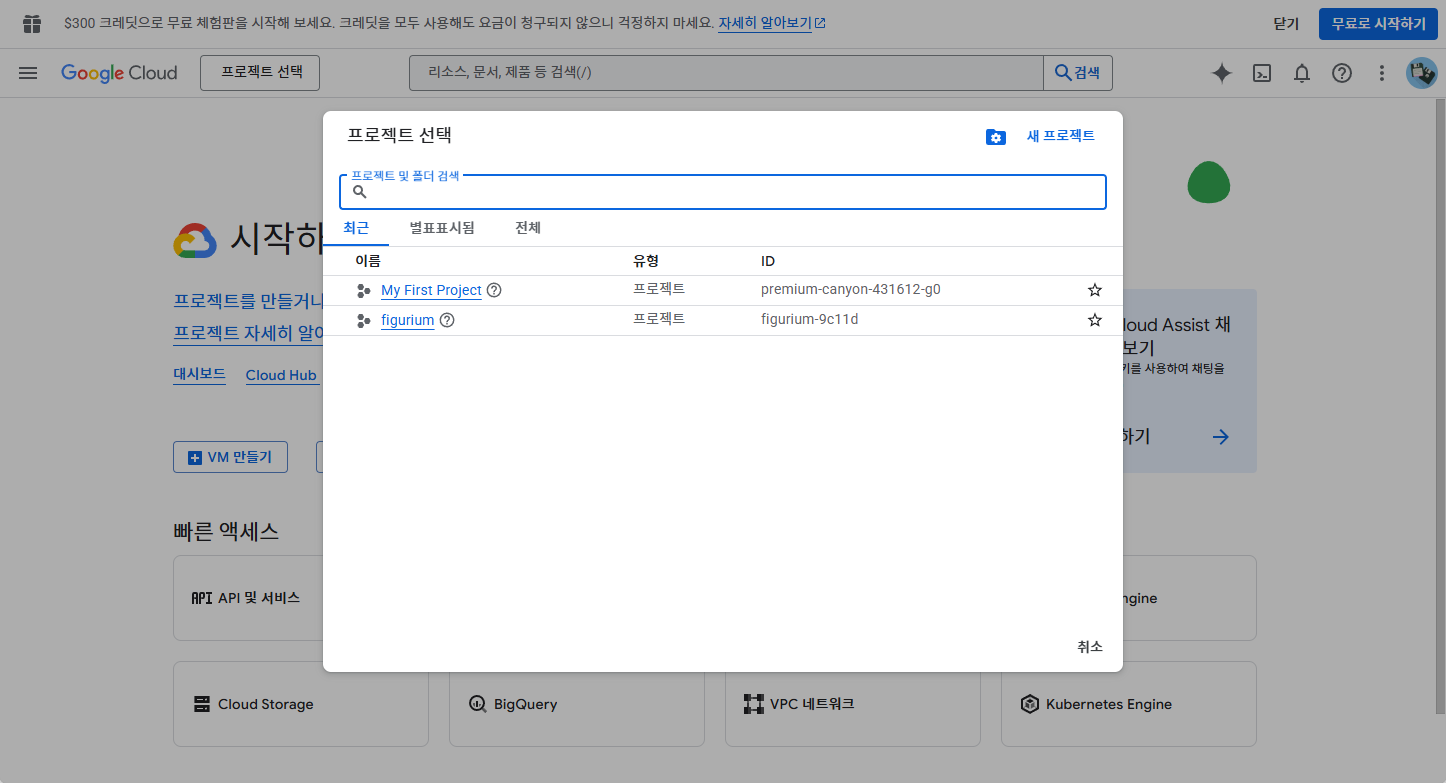
먼저 새 프로젝트를 생성해야 합니다.
Google Cloud Console로 이동하여 로그인 후 [프로젝트 선택 - 새 프로젝트]를 눌러줍니다.
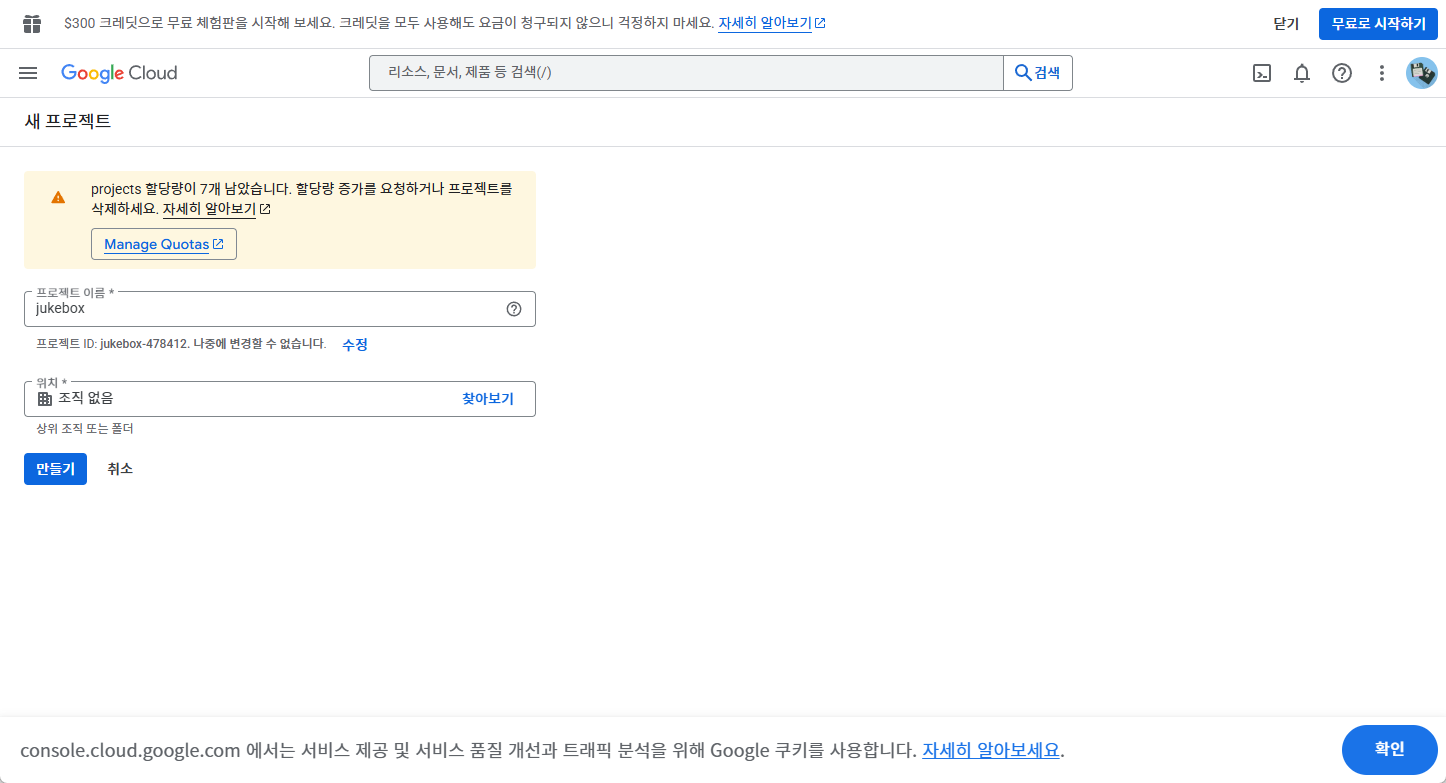
다음으로 프로젝트 이름을 지정하고 [만들기]를 클릭합니다.
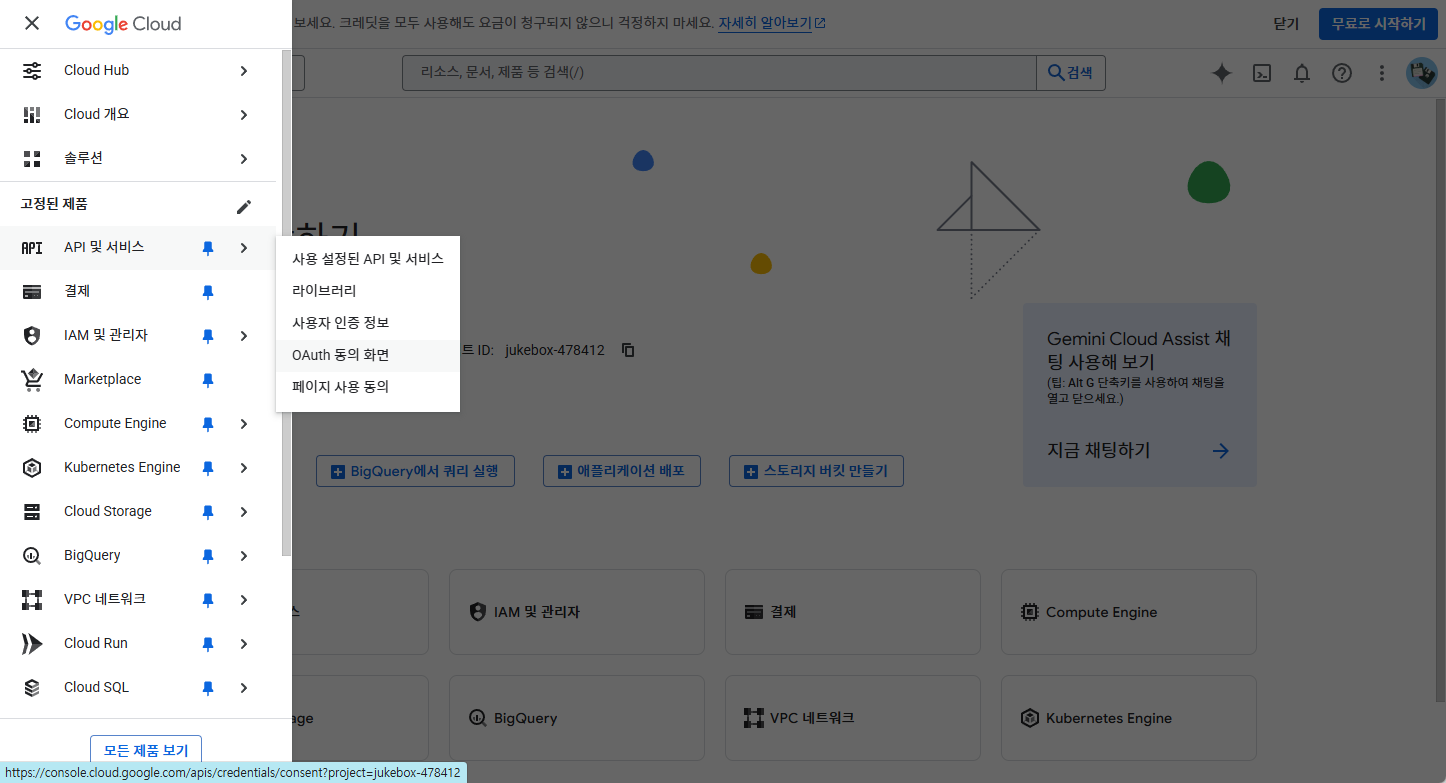
프로젝트가 생성되었으면, 면 좌측의 메뉴에서 [API 및 서비스 - OAuth 동의 화면]을 클릭합니다.
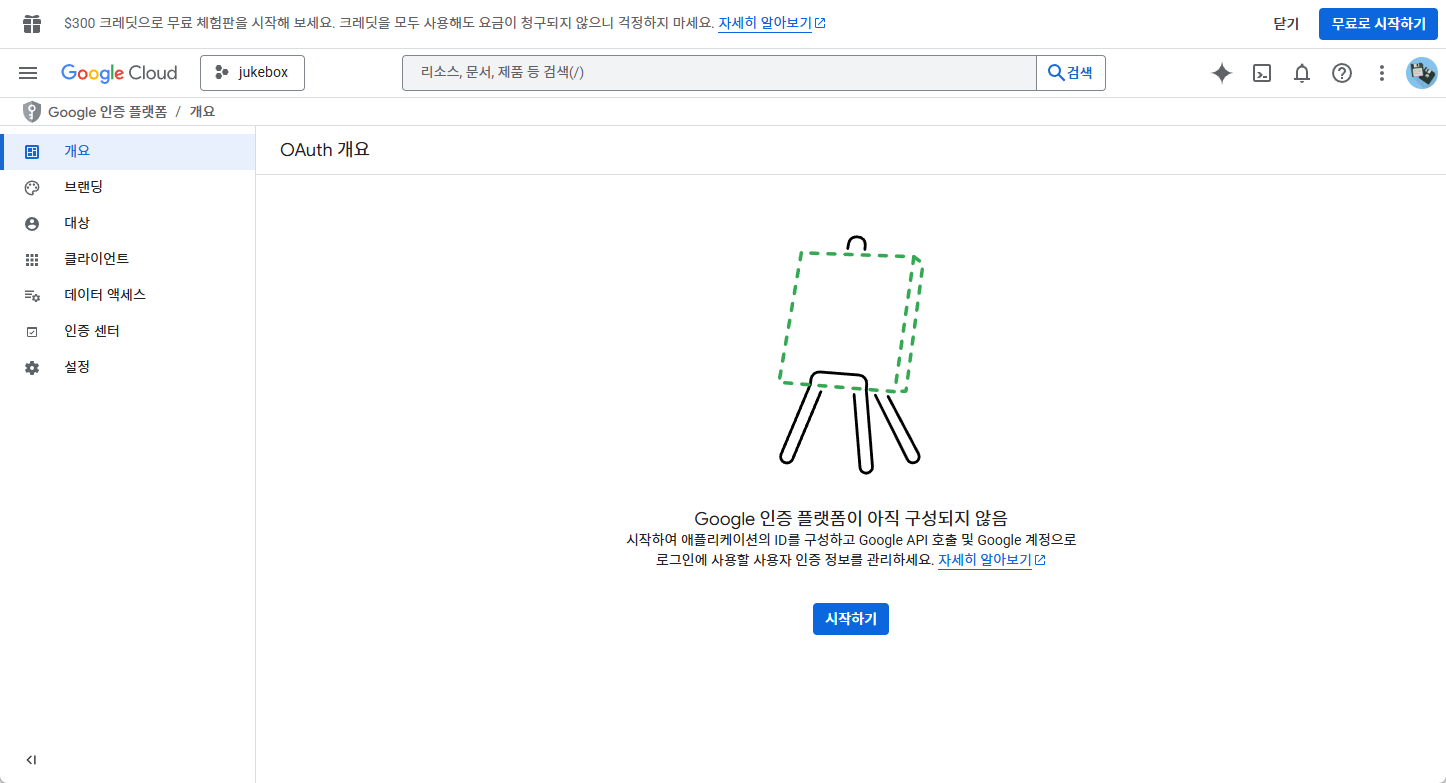
OAuth 개요에서 [시작하기] 버튼을 눌러줍니다.
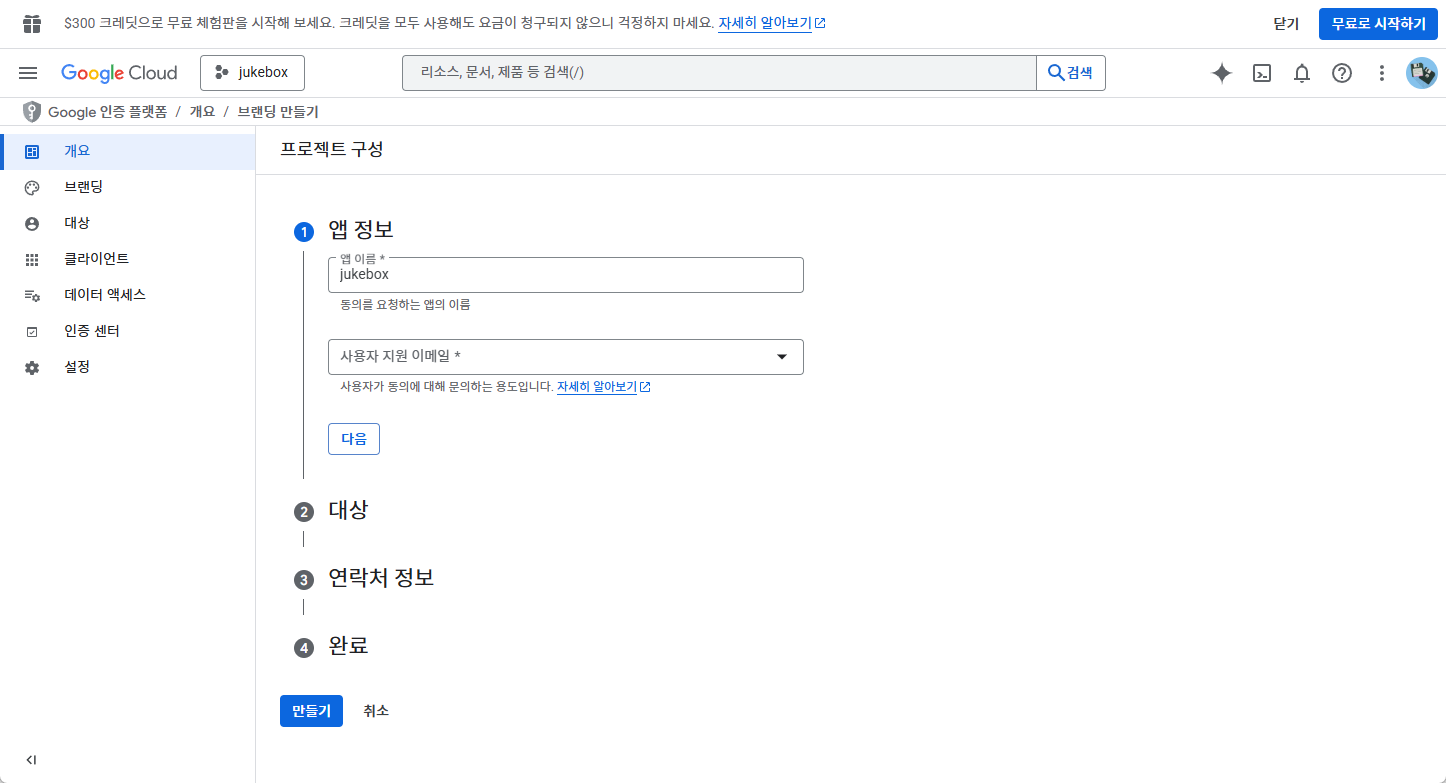
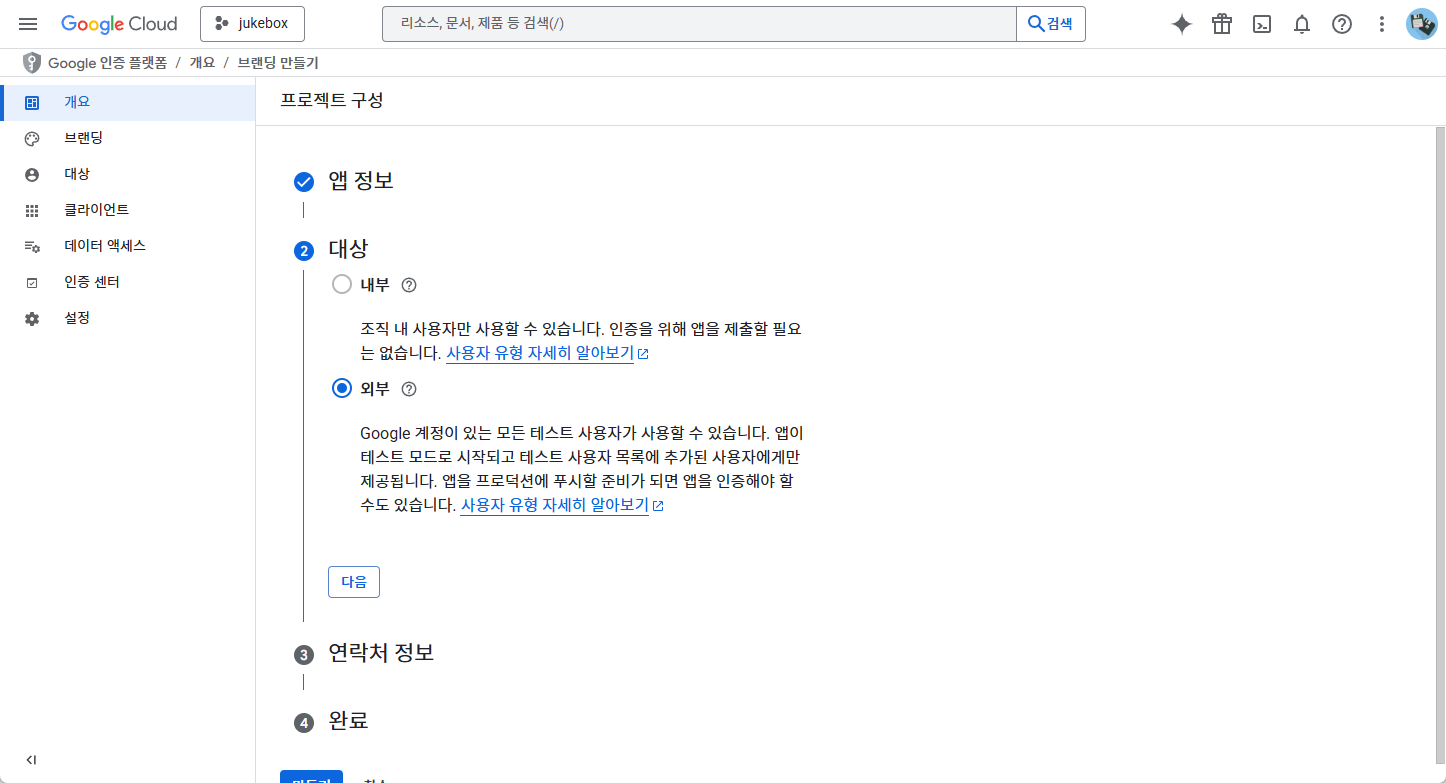
다음으로 프로젝트 구성을 작성합니다.
앱 정보 탭에서는 앱 이름과, 사용자가 지원 요청 시 전달받을 이메일을 지정합니다.
대상 탭에서는 외부를 선택해줍니다.
연락처 정보 탭에서는 연락처 정보 추가 해줍니다.
완료 탭에서는 구글 OAuth 정책에 동의함을 눌러줍니다.
모든 탭의 내용의 작성이 완료되면 만들기를 눌러줍니다.

다음으로 OAuth 클라이언트를 만들어야 합니다.
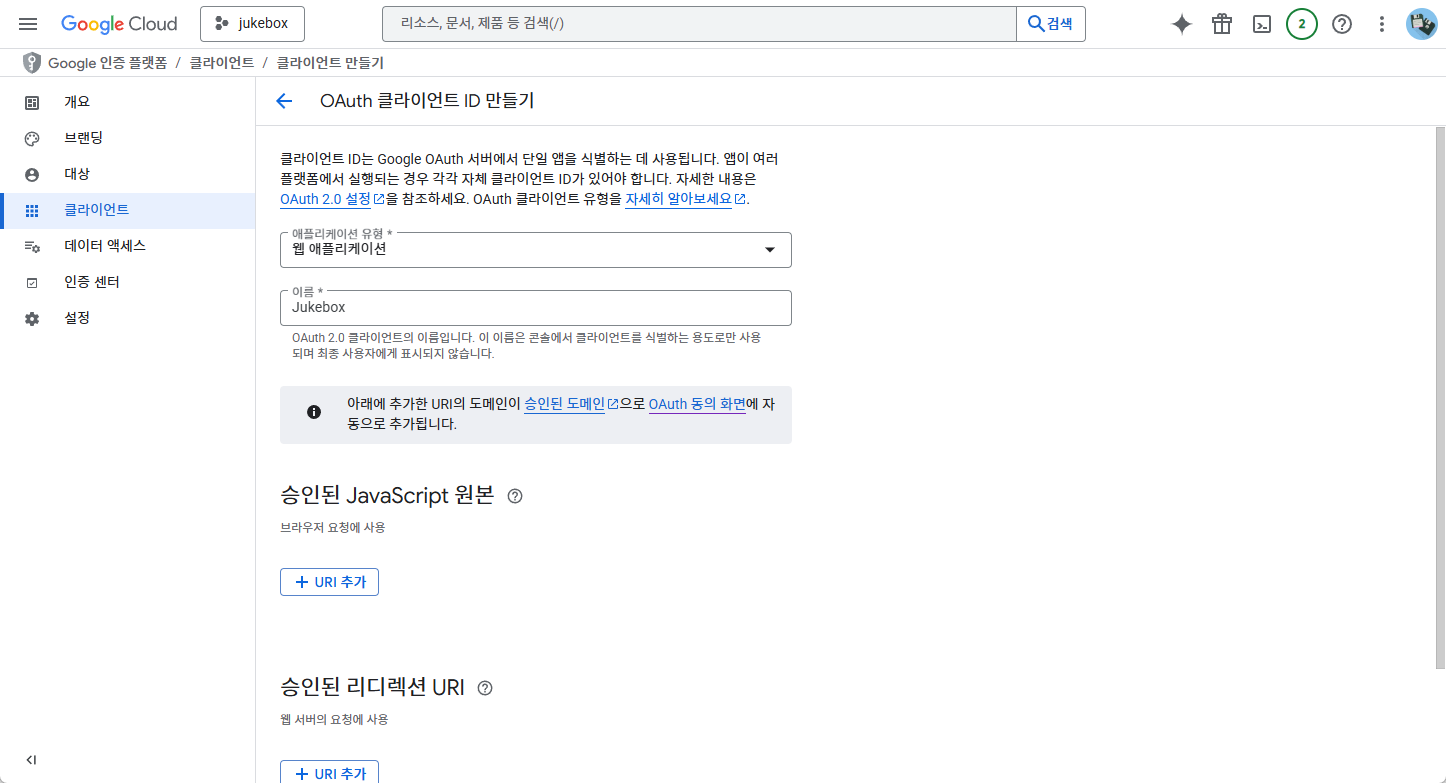
어플케이션 유형은 웹 어플리케이션을 선택합니다.
승인된 JavaScript 원본의 URI의 경우, 저희는 Spring Boot 백엔드 방식을 사용할 것이므로 사용하지 않습니다.
(Next.js 프론트로 직접 OAuth를 붙일 때만 필요함)
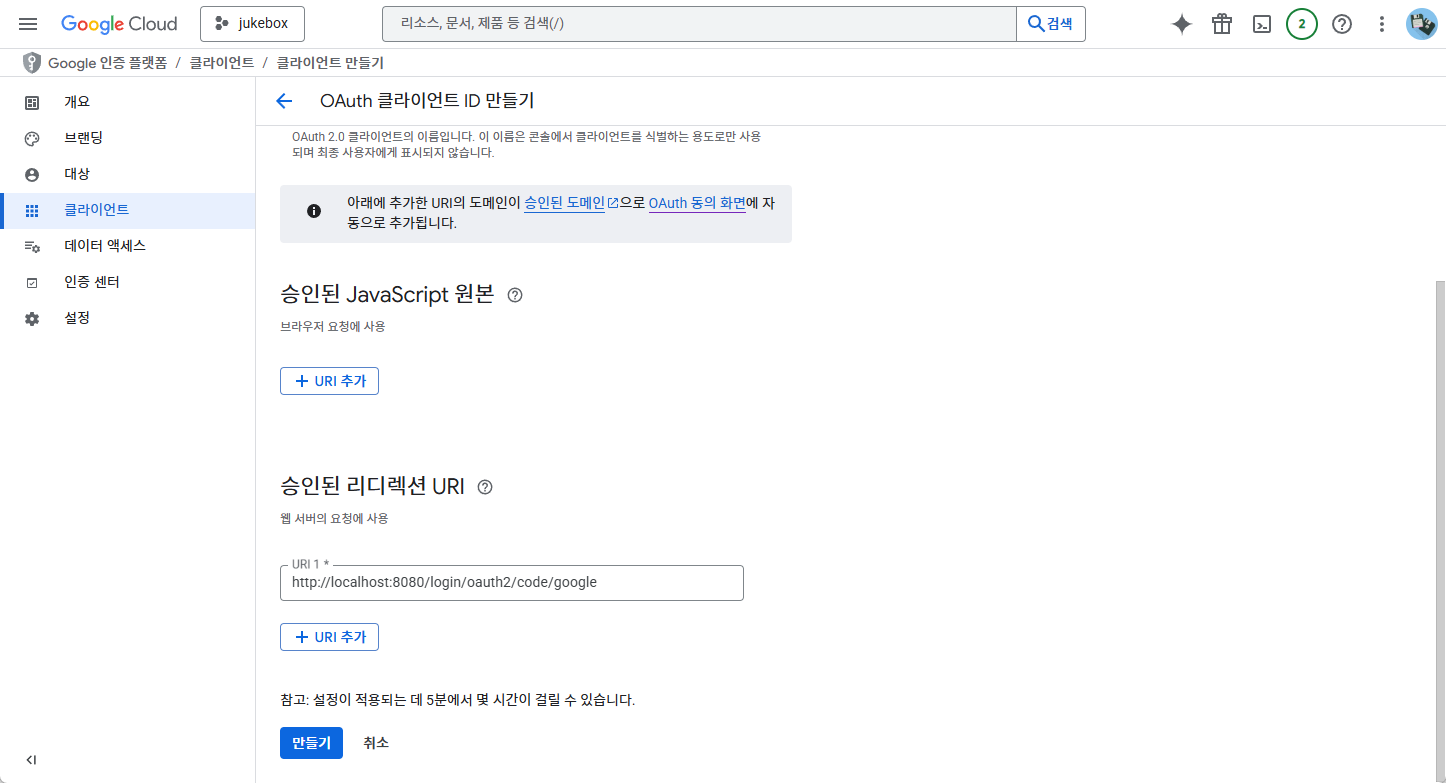
승인된 리디렉션 URI는 백엔드 주소를 입력해주어야 합니다.
Spring Security OAuth2 기본 값은 아래와 같은 형태입니다.
http://<백엔드주소>/login/oauth2/code/{provider}
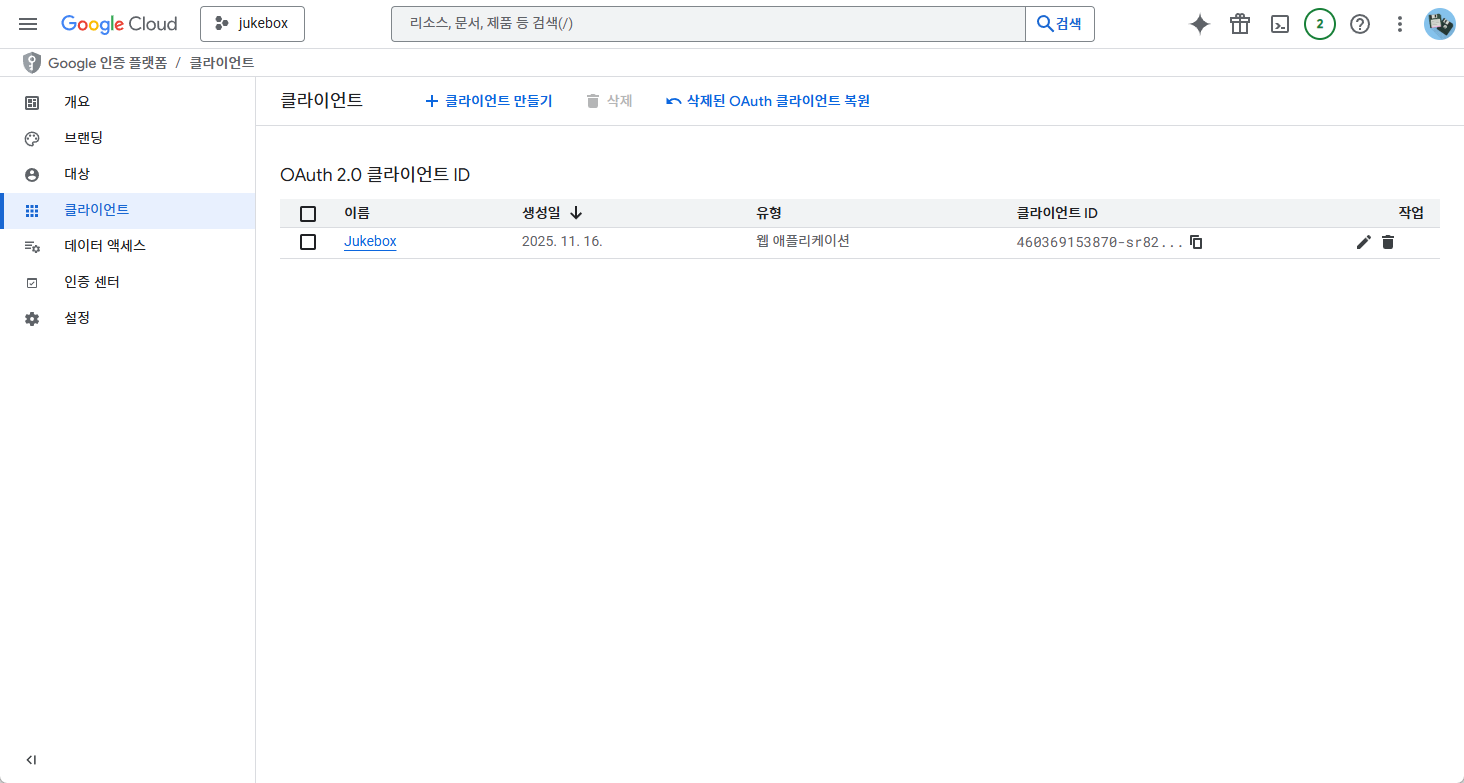
여기까지 완성하였으면 Google Cloud Console에서 진행할 설정은 모두 완료된 것입니다.
이때 클라이언트 ID와 Password는 Spring boot에서 설정 시 필요하므로 별도로 저장해두시기 바랍니다.
2. Spring 프로젝트 생성 및 설정
다음으로 스프링 프로젝트를 생성하고 적용해 보겠습니다.

start.spring.io에서 스프링 프로젝트 생성을 진행합니다.
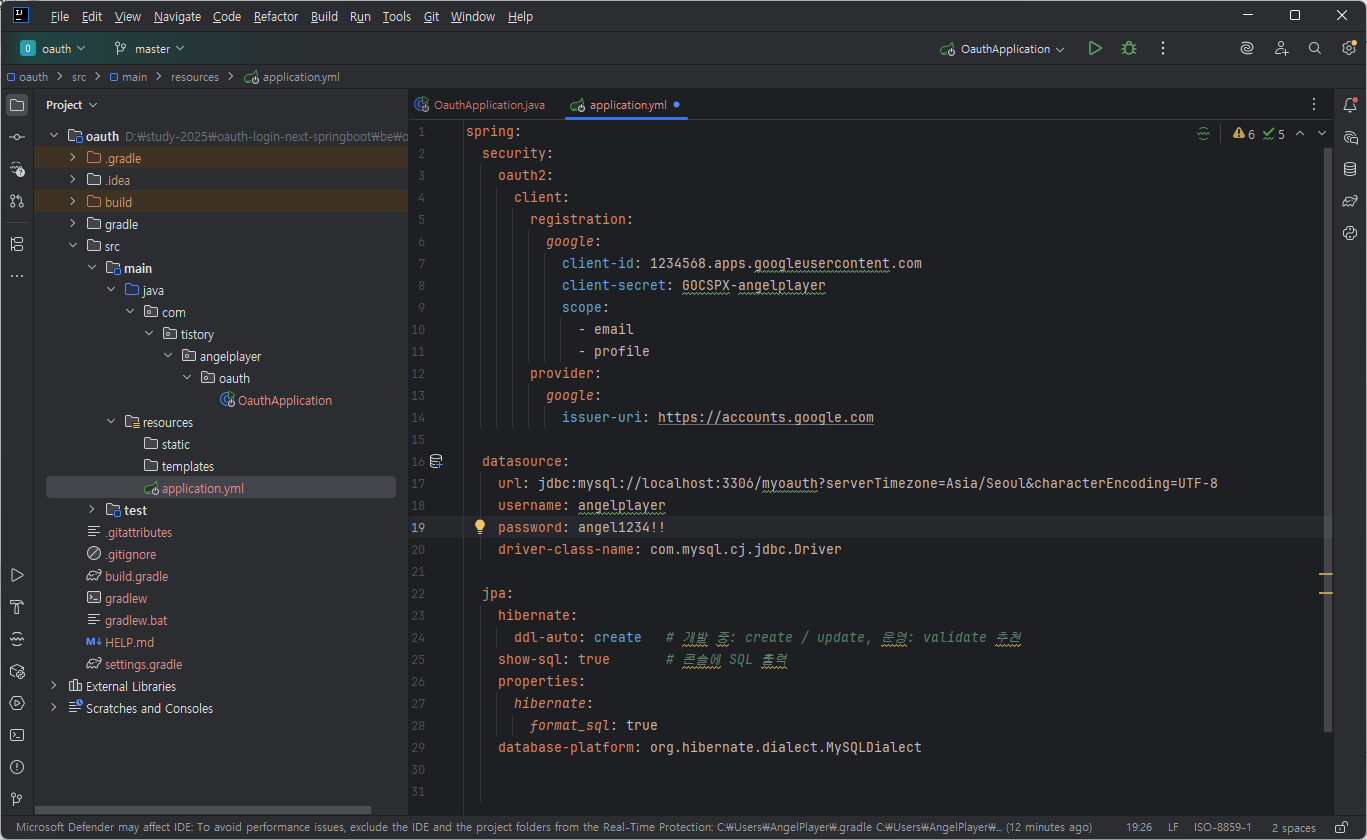
// src/resources/application.yml

spring:
  security:
    oauth2:
      client:
        registration:
          google:
            client-id: [GCC에서_제공받은_ID]
            client-secret: [GCC에서_제공받은 _PW]
            scope:
              - email
              - profile
        provider:
          google:
            issuer-uri: https://accounts.google.com

  datasource:
    url: jdbc:mysql://localhost:3306/내DB명?serverTimezone=Asia/Seoul&characterEncoding=UTF-8
    username: [USERNAME]
    password: [PASSWORD]
    driver-class-name: com.mysql.cj.jdbc.Driver

  jpa:
    hibernate:
      ddl-auto: create   # 개발 중: create / update, 운영: validate 추천
    show-sql: true       # 콘솔에 SQL 출력
    properties:
      hibernate:
        format_sql: true
    database-platform: org.hibernate.dialect.MySQLDialect
다음으로 프로젝트 설정을 진행합니다.
application.yml 파일을 생성하고 spring-security-oauth2에 설정을 작성합니다.
추가적으로 database도 연결을 진행해주시고, 저는 테스트를 위해 간단히 jpa까지 설정하였습니다.
// build.gradle

dependencies {
	implementation 'org.springframework.boot:spring-boot-starter-security'
	implementation 'org.springframework.boot:spring-boot-starter-web'
	compileOnly 'org.projectlombok:lombok'
	runtimeOnly 'com.mysql:mysql-connector-j'
	annotationProcessor 'org.projectlombok:lombok'
	testImplementation 'org.springframework.boot:spring-boot-starter-test'
	testImplementation 'org.springframework.security:spring-security-test'
	testRuntimeOnly 'org.junit.platform:junit-platform-launcher'

	implementation 'org.springframework.boot:spring-boot-starter-oauth2-client'
	implementation 'com.fasterxml.jackson.core:jackson-databind'
    implementation 'org.springframework.boot:spring-boot-starter-data-jpa'
}
다음으로 build.gradle에서 의존성을 추가해줍니다.
앞서 웹에서 프로젝트 생성 시 선택하지 않은 기능이 있다면 dependencies안에 추가하여 줍니다.
3. Spring Security & OAuth 로그인 기본 동작 만들기
com/tistory/angelplayer/oauth
    ├── OauthApplication.java                 # 스프링 부트 메인 클래스 (앱 실행 시작점)
    │
    ├── auth
    │    └── controller
    │         └── AuthController.java         # 로그인한 사용자 정보 반환 (/api/auth/me)
    │
    ├── config
    │    └── SecurityConfig.java              # OAuth2 + Spring Security 설정
    │                                          # (구글로그인, 세션 설정, CORS, 권한 관리 등)
    │
    └── guestbook
         ├── controller
         │    └── GuestbookController.java    # 방명록 API 진입점 (등록/조회 REST 컨트롤러)
         │
         ├── dto
         │    └── GuestbookRequestDto.java    # 방명록 등록 요청 DTO
         │
         ├── entity
         │    └── GuestbookEntry.java         # 방명록 엔티티 (DB 테이블 매핑)
         │
         ├── repository
         │    └── GuestbookEntryRepository.java  # 방명록 CRUD용 JPA Repository
         │
         └── service
              └── GuestbookService.java       # 방명록 비즈니스 로직 (저장/조회 처리)
백엔드 프로젝트의 전체 구조는 위와 같습니다.
package com.tistory.angelplayer.oauth.auth.controller;

import org.springframework.security.core.annotation.AuthenticationPrincipal;
import org.springframework.security.oauth2.core.user.OAuth2User;
import org.springframework.web.bind.annotation.GetMapping;
import org.springframework.web.bind.annotation.RequestMapping;
import org.springframework.web.bind.annotation.RestController;

import java.util.Map;

@RestController
@RequestMapping("/api/auth")
public class AuthController {

    @GetMapping("/me")
    public Map<String, Object> me(@AuthenticationPrincipal OAuth2User principal) {
        if (principal == null) {
            return Map.of("authenticated", false);
        }
        Map<String, Object> attrs = principal.getAttributes();
        return Map.of(
                "authenticated", true,
                "email", attrs.get("email"),
                "name", attrs.get("name"),
                "picture", attrs.get("picture")
        );
    }
}
1) AuthController.java
현재 요청을 보낸 브라우저/클라이언트가 로그인된 상태인지 확인
로그인 상태라면 OAuth2User 의 getAttributes() 를 통해 email, name, picture 등 구글 사용자 정보를 가져와서 반환
로그인 안돼 있으면 { authenticated: false } 응답
프론트엔드(Next.js)가 초기 렌더링 시 “로그인 여부 확인” 용도로 호출하는 API
package com.tistory.angelplayer.oauth.config;

import org.springframework.context.annotation.Bean;
import org.springframework.context.annotation.Configuration;
import org.springframework.security.config.Customizer;
import org.springframework.security.config.annotation.web.builders.HttpSecurity;
import org.springframework.security.config.annotation.web.configuration.EnableWebSecurity;
import org.springframework.security.web.SecurityFilterChain;
import org.springframework.web.cors.CorsConfiguration;
import org.springframework.web.cors.CorsConfigurationSource;
import org.springframework.web.cors.UrlBasedCorsConfigurationSource;

import java.util.List;

@Configuration
@EnableWebSecurity
public class SecurityConfig {

    @Bean
    public SecurityFilterChain filterChain(HttpSecurity http) throws Exception {
        http
                .csrf(csrf -> csrf.disable())
                .cors(Customizer.withDefaults())
                .authorizeHttpRequests(auth -> auth
                        .requestMatchers("/", "/error").permitAll()
                        .requestMatchers("/api/auth/**").permitAll()
                        .requestMatchers("/api/guestbook").permitAll()      // GET 허용
                        .requestMatchers("/api/guestbook/**").authenticated() // POST 등은 로그인 필요
                        .anyRequest().authenticated()
                )
                .oauth2Login(oauth -> oauth
                        .defaultSuccessUrl("http://localhost:3000", true)
                )
                .logout(logout -> logout
                        .logoutUrl("/logout")
                        .logoutSuccessUrl("http://localhost:3000")
                );

        return http.build();
    }

    // CORS 설정 (Next.js 3000 포트 허용)
    @Bean
    public CorsConfigurationSource corsConfigurationSource() {
        CorsConfiguration config = new CorsConfiguration();
        config.setAllowedOriginPatterns(List.of("http://localhost:3000"));
        config.setAllowedMethods(List.of("GET", "POST", "PUT", "DELETE", "OPTIONS"));
        config.setAllowedHeaders(List.of("*"));
        config.setAllowCredentials(true);

        UrlBasedCorsConfigurationSource source = new UrlBasedCorsConfigurationSource();
        source.registerCorsConfiguration("/**", config);
        return source;
    }
}
2) SecurityConfig.java (config)
스프링 시큐리티 전체 설정을 담당.
어떤 URL이 인증 없이 접근 가능한지 (permitAll),
어떤 URL이 로그인 필요한지 (authenticated) 정의.
OAuth2 로그인 설정
/oauth2/authorization/google → 구글 로그인 페이지로 연결
로그인 성공 시 defaultSuccessUrl("http://localhost:3000") 로 리다이렉트
CORS 설정 : Next.js(3000 포트)에서 오는 요청을 허용 (credentials 허용 등)
package com.tistory.angelplayer.oauth.guestbook.entity;

import jakarta.persistence.*;
import lombok.*;
import java.time.LocalDateTime;

@Entity
@Table(name = "guestbook_entry")
@Getter @Setter
@NoArgsConstructor
@AllArgsConstructor
@Builder
public class GuestbookEntry {

    @Id
    @GeneratedValue(strategy = GenerationType.IDENTITY)
    private Long id;

    private String userEmail;
    private String userName;

    @Column(length = 1000)
    private String message;

    private LocalDateTime createdAt;
}
3) GuestbookEntry.java (guestbook.entity)
JPA 엔티티(= DB 테이블과 매핑되는 클래스)
package com.tistory.angelplayer.oauth.guestbook.repository;


import com.tistory.angelplayer.oauth.guestbook.entity.GuestbookEntry;
import org.springframework.data.jpa.repository.JpaRepository;

import java.util.List;

public interface GuestbookEntryRepository extends JpaRepository<GuestbookEntry, Long> {

    List<GuestbookEntry> findAllByOrderByCreatedAtDesc();
}
4) GuestbookEntryRepository.java
save(), findById(), findAll() 등 기본 CRUD 메서드를 자동 제공.
커스텀 메서드 findAllByOrderByCreatedAtDesc() 를 통해 방명록 목록을 createdAt 기준 내림차순으로 정렬해서 조회.
실제로 SQL을 직접 작성하지 않아도 GuestbookEntryRepository 를 통해 DB에 접근할 수 있게 해주는 레이어.
package com.tistory.angelplayer.oauth.guestbook.dto;

import lombok.Getter;
import lombok.Setter;

@Getter
@Setter
public class GuestbookRequestDto {
    private String message;
}
5) GuestbookRequestDto.java
클라이언트에서 방명록 글 작성 요청 시 받는 데이터 형태.
Controller 에서 @RequestBody 로 받아서 검증/전달용 객체로 사용.
엔티티(GuestbookEntry)와 분리해서, “요청으로 들어오는 데이터”와 “DB 저장 구조”를 깔끔하게 나누는 역할.
package com.tistory.angelplayer.oauth.guestbook.service;

import com.tistory.angelplayer.oauth.guestbook.entity.GuestbookEntry;
import com.tistory.angelplayer.oauth.guestbook.dto.GuestbookRequestDto;
import com.tistory.angelplayer.oauth.guestbook.repository.GuestbookEntryRepository;
import lombok.RequiredArgsConstructor;
import org.springframework.stereotype.Service;

import java.time.LocalDateTime;
import java.util.List;

@Service
@RequiredArgsConstructor
public class GuestbookService {

    private final GuestbookEntryRepository repository;

    public List<GuestbookEntry> getAllEntries() {
        return repository.findAllByOrderByCreatedAtDesc();
    }

    public GuestbookEntry createEntry(String userEmail, String userName, GuestbookRequestDto dto) {
        GuestbookEntry entry = GuestbookEntry.builder()
                .userEmail(userEmail)
                .userName(userName)
                .message(dto.getMessage())
                .createdAt(LocalDateTime.now())
                .build();

        return repository.save(entry);
    }
}
6) GuestbookService.java (guestbook.service)
비즈니스 로직 담당.
getAllEntries() : GuestbookEntryRepository를 사용해 방명록 전체 목록 조회.
createEntry(String userEmail, String userName, GuestbookRequestDto dto) : DTO와 사용자 정보를 조합해 GuestbookEntry 생성
Repository로 저장 후 결과 반환
Controller는 “HTTP 요청/응답 처리”에 집중하고, Service는 “로직/규칙/처리 순서”에 집중하게 해주는 구조.
package com.tistory.angelplayer.oauth.guestbook.controller;


import com.tistory.angelplayer.oauth.guestbook.entity.GuestbookEntry;
import com.tistory.angelplayer.oauth.guestbook.dto.GuestbookRequestDto;
import com.tistory.angelplayer.oauth.guestbook.service.GuestbookService;
import lombok.RequiredArgsConstructor;
import org.springframework.http.HttpStatus;
import org.springframework.security.core.annotation.AuthenticationPrincipal;
import org.springframework.security.oauth2.core.user.OAuth2User;
import org.springframework.web.bind.annotation.*;
import org.springframework.web.server.ResponseStatusException;

import java.util.List;
import java.util.Map;

@RestController
@RequestMapping("/api/guestbook")
@RequiredArgsConstructor
public class GuestbookController {

    private final GuestbookService guestbookService;

    // 방명록 목록 조회 (누구나 볼 수 있음)
    @GetMapping
    public List<GuestbookEntry> list() {
        return guestbookService.getAllEntries();
    }

    // 방명록 글 작성 (로그인한 사용자만)
    @PostMapping
    public GuestbookEntry add(
            @RequestBody GuestbookRequestDto dto,
            @AuthenticationPrincipal OAuth2User principal
    ) {
        if (principal == null) {
            throw new ResponseStatusException(HttpStatus.UNAUTHORIZED, "로그인이 필요합니다.");
        }

        if (dto.getMessage() == null || dto.getMessage().trim().isEmpty()) {
            throw new ResponseStatusException(HttpStatus.BAD_REQUEST, "메시지를 입력하세요.");
        }

        Map<String, Object> attrs = principal.getAttributes();
        String email = (String) attrs.get("email");
        String name = (String) attrs.get("name");

        return guestbookService.createEntry(email, name, dto);
    }
}
7) GuestbookController.java
GET /api/guestbook
누구나 방명록 목록을 조회할 수 있게 함
guestbookService.getAllEntries() 호출 후 결과 반환
POST /api/guestbook
@RequestBody GuestbookRequestDto 로 메시지를 받고
@AuthenticationPrincipal OAuth2User 로 로그인한 사용자 정보 가져온 뒤
정상이라면 guestbookService.createEntry(...) 호출해 새 글 저장 후 반환
즉, HTTP → DTO/Principal 파싱 → Service 호출 → 응답 을 담당하는 레이어.
3. Next js 설정 및 소스코드
1) 프로젝트 생성
$ npx create-next-app@latest fe

$ cd fe

$ npm run dev
next.js 프로젝트 생성을 진행합니다.
생성 이후 npm run dev 명령 실행 시 http://localhost:3000 페이지가 정상적으로 출력되면 프로젝트가 정상적으로 생성 된 것입니다.
2) 백엔드 주소 환경변수 설정
// fe/.env.local
NEXT_PUBLIC_API_BASE_URL=http://localhost:8080
루트 위치에 .env.local 파일을 생성하고 백엔드 주소와 포트를 작성해줍니다.
3) src/app/page.tsx
"use client";

import { useEffect, useState, FormEvent } from "react";

const API_BASE = process.env.NEXT_PUBLIC_API_BASE_URL!;

// 백엔드 /api/auth/me 응답 타입
type MeResponse = {
  authenticated: boolean;
  email?: string;
  name?: string;
  picture?: string;
};

// 백엔드 /api/guestbook 응답 타입
type GuestbookEntry = {
  id: number;
  userEmail: string;
  userName: string;
  message: string;
  createdAt: string;
};

export default function HomePage() {
  const [me, setMe] = useState<MeResponse | null>(null);
  const [entries, setEntries] = useState<GuestbookEntry[]>([]);
  const [message, setMessage] = useState("");
  const [loading, setLoading] = useState(false);

  // 1) 로그인 정보 가져오기
  const fetchMe = async () => {
    try {
      const res = await fetch(`${API_BASE}/api/auth/me`, {
        credentials: "include", // ✅ 세션 쿠키(JSESSIONID) 포함
      });
      const data: MeResponse = await res.json();
      setMe(data);
    } catch (e) {
      console.error(e);
      setMe({ authenticated: false });
    }
  };

  // 2) 방명록 목록 가져오기
  const fetchEntries = async () => {
    try {
      const res = await fetch(`${API_BASE}/api/guestbook`, {
        credentials: "include",
      });
      if (!res.ok) return;
      const data: GuestbookEntry[] = await res.json();
      setEntries(data);
    } catch (e) {
      console.error(e);
    }
  };

  // 첫 로딩 시 로그인 정보 확인
  useEffect(() => {
    fetchMe();
  }, []);

  // 로그인 상태가 되면 방명록 목록 로딩
  useEffect(() => {
    if (me?.authenticated) {
      fetchEntries();
    }
  }, [me]);

  // Google 로그인 버튼 클릭 시
  const handleLogin = () => {
    window.location.href = `${API_BASE}/oauth2/authorization/google`;
  };

  // 로그아웃 (선택사항)
  const handleLogout = () => {
    window.location.href = `${API_BASE}/logout`;
  };

  // 방명록 등록
  const handleSubmit = async (e: FormEvent) => {
    e.preventDefault();
    if (!message.trim()) return;
    setLoading(true);
    try {
      const res = await fetch(`${API_BASE}/api/guestbook`, {
        method: "POST",
        headers: { "Content-Type": "application/json" },
        credentials: "include",
        body: JSON.stringify({ message }),
      });

      if (!res.ok) {
        alert("등록에 실패했습니다. 로그인 상태를 확인해주세요.");
        return;
      }

      setMessage("");
      await fetchEntries();
    } catch (err) {
      console.error(err);
      alert("에러가 발생했습니다.");
    } finally {
      setLoading(false);
    }
  };

  // 아직 /api/auth/me 응답 전
  if (me === null) {
    return (
      <main style={{ padding: 24 }}>
        <h1>Google OAuth 방명록</h1>
        <p>로그인 상태 확인 중...</p>
      </main>
    );
  }

  // 로그인 안 된 경우
  if (!me.authenticated) {
    return (
      <main style={{ padding: 24 }}>
        <h1>Google OAuth 방명록</h1>
        <p>방명록을 남기려면 Google 계정으로 로그인 해주세요.</p>
        <button onClick={handleLogin}>Google로 로그인</button>
      </main>
    );
  }

  // 로그인 된 경우
  return (
    <main style={{ padding: 24, maxWidth: 600 }}>
      <h1>Google OAuth 방명록</h1>

      <section style={{ marginBottom: 24 }}>
        <p>
          안녕하세요, <b>{me.name}</b> ({me.email})
        </p>
        <button onClick={handleLogout}>로그아웃</button>
      </section>

      <section style={{ marginBottom: 24 }}>
        <form onSubmit={handleSubmit}>
          <textarea
            style={{ width: "100%", minHeight: 80 }}
            value={message}
            onChange={(e) => setMessage(e.target.value)}
            placeholder="방명록을 남겨보세요"
          />
          <div style={{ marginTop: 8 }}>
            <button type="submit" disabled={loading}>
              {loading ? "등록 중..." : "등록"}
            </button>
          </div>
        </form>
      </section>

      <section>
        <h2>방명록 목록</h2>
        {entries.length === 0 ? (
          <p>아직 방명록이 없습니다.</p>
        ) : (
          <ul style={{ listStyle: "none", padding: 0 }}>
            {entries.map((e) => (
              <li
                key={e.id}
                style={{
                  border: "1px solid #ddd",
                  padding: 12,
                  marginBottom: 8,
                  borderRadius: 4,
                }}
              >
                <div>
                  <b>{e.userName}</b> ({e.userEmail})
                </div>
                <div style={{ margin: "4px 0" }}>{e.message}</div>
                <div style={{ fontSize: 12, color: "#666" }}>
                  {new Date(e.createdAt).toLocaleString()}
                </div>
              </li>
            ))}
          </ul>
        )}
      </section>
    </main>
  );
}
핵심 기능은 Goolge OAuth이므로 프론트 단은 간단히 구현하였습니다.
4. 요약 정리
1. 지금까지 구현한 전체 기능 요약
Google OAuth 로그인 구현
- 프론트에서 “Google 로그인” 클릭
- Google OAuth 인증 서버로 이동
- 인증 후 Google이 code를 우리 서버로 전달
- 우리 서버(Spring)가 Google 서버에서 사용자 프로필 정보 가져옴
- 사용자 정보를 세션에 저장
- 로그인 성공 후 프론트로 redirect
- 프론트는 세션 기반으로 로그인 유지
세션(Session) 기반 사용자 인증
- 구글 로그인 성공 → 서버가 세션 생성
- 세션 ID를 브라우저 쿠키(JSESSIONID)에 저장
- 이후 요청 시 쿠키에 담긴 세션 ID를 사용해 로그인 여부 확인
2. 코드의 동작 흐름
① 프론트 → Google 인증 요청
사용자가 Google 로그인 버튼 클릭
⬇
프론트에서 다음 주소로 이동:
GET http://localhost:8080/oauth2/authorization/google
② Google → 서버로 authorization code 전달
구글이 로그인 성공
⬇
Redirect:
GET http://localhost:8080/login/oauth2/code/google?code=xxxx
③ 백엔드에서 Google API 호출 & 사용자 정보 획득
Spring Security가 자동으로:
code → access_token 교환
access_token → 사용자 정보 요청
얻은 정보:
email
name
profile_image
google_id
④ 세션(Session)에 사용자 정보 저장
Spring Security의 기본 동작
→ 서버 세션에 Authentication 저장
⬇
JSESSIONID 쿠키 생성 후 프론트로 전달
⑤ 프론트에서 방명록 작성 요청
프론트가 방명록 API 호출:
POST /api/guestbook
content: "안녕하세요!"
브라우저는 자동으로 쿠키(JSESSIONID)를 함께 보냄
서버는 세션에서 사용자 정보 조회
로그인된 사용자로 판단
방명록 저장
3. JSESSIONID 검증 방법
① 동작 방식
0) JSESSIONID 전달
로그인 성공 시 서버가 JSESSIONID를 내려줌
브라우저는 쿠키에 JSESSIONID를 저장하고 있음
1) 브라우저 Request
이후 브라우저는 요청에 JSESSIONID 쿠키를 함께 실어 서버로 전달
2) 서버 검증
소스코드에서 직접 세션을 검증하는 단계는 없음
@AuthenticationPrincipal를 통해서
톰캣 + 스프링 시큐리티가 필터 레벨에서 자동으로 검증
- 요청이 들어오면, 톰캣이 쿠키에서 JSESSIONID 값을 읽음
- 이 ID로 톰캣 내부 세션 저장소(메모리)에서 HttpSession을 찾음
- 세션이 있고, 만료 시간이 지나지 않았다면 HttpServletRequest에 HttpSession을 붙여서 스프링에게 넘김
- 스프링 시큐리티는 그 세션에 저장된 SecurityContext(로그인 정보)를 꺼냄
- 그 안에 OAuth2User 가 있으면 “로그인 된 사용자”라고 판단
② JSESSIONID 유효기간 / 만료 관리
1) 서버 만료
server.servlet.session.timeout을 통해서
만료시간을 설정할 수 있으며, 없으면 톰캣 기본값(보통 30분 비활성 시 만료) 적용
2) 클라이언트 만료 (브라우저 쿠키 라이프사이클)
Max-Age나 Expires를 사용해 관리
따로 지정하지 않으면 세션 쿠키로 취급 (브라우저를 닫을 떄 쿠키 삭제)
3) 로그아웃 요청
Spring Security가 HttpSession.invalidate() 호출
→ 서버 쪽 세션 삭제
→ JSESSIONID 쿠키도 만료시키는 응답 헤더를 내려줌
'Web > etc' 카테고리의 다른 글
| [Redis] Windows에 Redis 설치하기 (0) | 2025.12.20 |
|---|---|
| [OAuth] 02 Session에서 JWT + Token 방식으로 전환 (0) | 2025.12.01 |
| [URL] 구매한 도메인 주소 이전하기 (Cafe24 -> 가비아) (0) | 2024.11.07 |
| [SEO] 웹사이트 구축 후 검색 엔진 최적화 설정 (Feat. Next.js) (6) | 2024.10.16 |
| [Vercel] 도메인 주소 변경하기 (Feat. Cafe24) (0) | 2024.07.20 |